---
description: >-
Welcome to the documentation for our latest feature – AI-based Text-to-Speech
(TTS).
---
# AI Text-to-Speech Feature
### Benefits
* **High-Quality Speech**: Our AI model produces high-quality, natural-sounding speech with improved expressiveness and clarity.
* **Customization Options**: Tailor the generated speech by adjusting parameters such as pitch, speed, and voice style to suit your specific needs.
_Feel free to listen to the samples and choose the one you'd like to generate._
1. **Select the option Paid.**
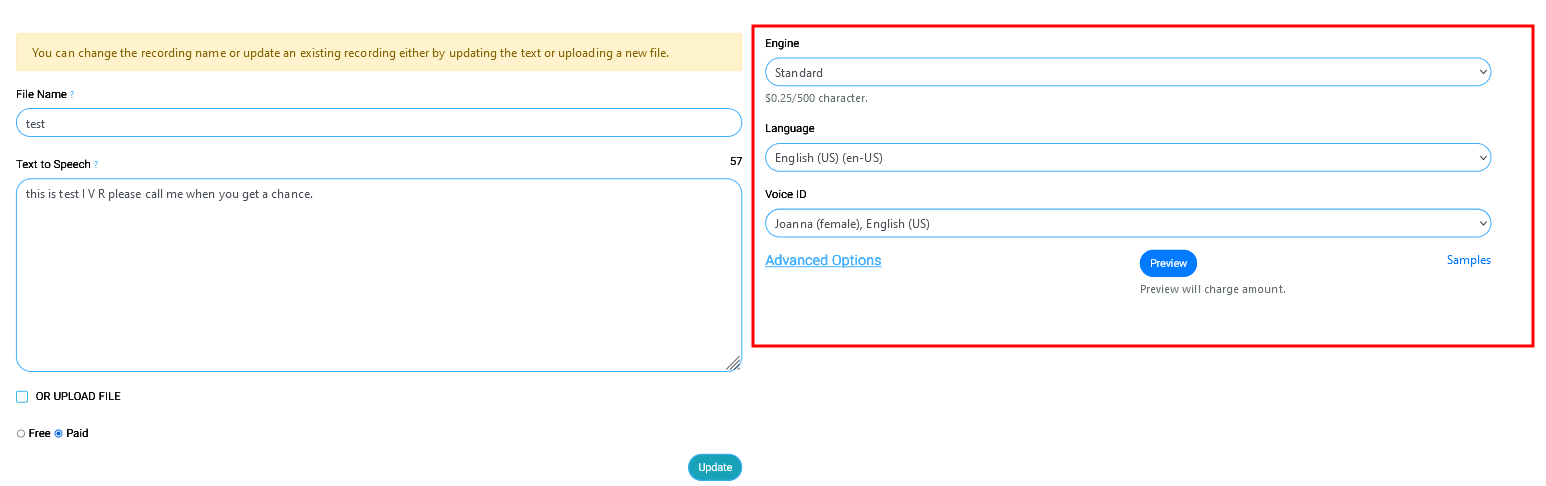
2. You will see a new menu on the right-hand side with various options like Engine, Language and Voice ID.
3. You can also click Advanced Options to get more controls like Volume, Rate and Pitch. This will help you further customize the audio.
You can click the **Samples** so that you can listen to _free_ sample audio before generating a preview of the desired audio file.
_Note: Generating a preview will charge a minimal amount of fee as mentioned on the page._
After generating the preview audio, you can hit **Confirm** to select this file. If you generate a preview for multiple files then you will see multiple files with the confirm option.